


Many people think ergonomics means buying an expensive chair or forcing themselves to sit perfectly straight all day. In reality, ergonomics is much broader. It is about designing your workstation, tools, posture, movement habits, and work routine so that your body is not placed under unnecessary strain for hours at a time.
This matters because many people now spend a large part of the day working at a computer. Whether you work in an office, work from home, study on a laptop, answer emails, use a mouse, or spend hours typing, your workstation can influence how your neck, shoulders, back, wrists, and hands feel by the end of the day.
Computer-related discomfort is not always caused by one dramatic injury. More often, it develops from small repeated stresses: reaching for a mouse, typing with the wrists bent, looking down at a screen, sitting too long, using a laptop without support, or holding the shoulders tense while working. Over time, these habits may contribute to neck pain, shoulder tension, upper back stiffness, low back pain, headaches, wrist discomfort, forearm tightness, and hand symptoms.
The good news is that many ergonomic issues can be improved with simple changes. The important point is that ergonomics should not be seen as one magic solution. It works best when combined with movement breaks, strengthening, stretching, workload management, and individualized care when symptoms persist.
Why Ergonomics Is Important
Ergonomics is important because the body was not designed to stay in one fixed position for hours. Muscles, joints, tendons, and nerves tolerate movement well, but they can become irritated when the same posture or repetitive task is sustained for long periods.
Work-related neck and upper limb musculoskeletal disorders are common among office workers. A Cochrane review on ergonomic interventions for office workers noted that work-related upper limb and neck musculoskeletal disorders are among the most common occupational disorders worldwide, with studies reporting that approximately 20% to 60% of office workers experience musculoskeletal disorders (Hoe et al., 2018).
This does not mean every office worker will develop pain. It means that computer-based work can create physical demands that deserve attention. The neck, shoulders, wrists, hands, upper back, and low back are all exposed to repeated or sustained loading during desk work.
In a major prospective study of newly hired computer users, researchers followed workers who used video display terminals, or computer workstations, for more than 15 hours per week. The study found that upper-extremity musculoskeletal symptoms were common among computer users. Neck and shoulder symptoms were especially frequent, and neck and shoulder disorders were more common than hand and arm disorders (Gerr, 2001).
The same report found that many computer users worked in non-neutral postures. Approximately 61% were observed in non-neutral shoulder postures and 41% were observed in non-neutral wrist postures (Gerr, 2001). This is important because it suggests that many people are not simply “sitting badly” because they are careless. Their workstation setup, equipment placement, work demands, and habits may be encouraging awkward positions.
Ergonomics matters because those awkward positions can add up.
Ergonomics Is Not One-Size-Fits-All
One of the most important points from the ergonomics literature is that workstation recommendations are not always consistent. A review of global ergonomics standards and guidelines for computer workstation design found considerable disagreement between different standards, especially when comparing current guidelines with prior ergonomics research (Woo et al., 2016).
This is a key point. There is no single perfect desk setup that works for everyone. Body size, job duties, equipment, vision needs, typing volume, mouse use, chair design, desk height, monitor size, and work habits all influence what setup is best.
A tall person and a shorter person may need different chair and monitor heights. A person who types all day may need different support than someone who mainly reads documents. A laptop user may need a different setup than someone using two large monitors. Someone with neck pain may need different adjustments than someone with wrist discomfort.
This is why ergonomics should be practical and individualized. The goal is not to copy a diagram perfectly. The goal is to reduce strain, support comfort, and make it easier for your body to move well through the day.
The Evidence Is Helpful, But Not Perfect
Ergonomics is commonly recommended for office-related neck, shoulder, arm, and wrist pain. However, the research is more nuanced than many people realize.
A Cochrane review examined randomized controlled trials of ergonomic interventions for preventing work-related upper limb and neck musculoskeletal disorders among office workers. The review included 15 studies with 2,165 workers and looked at physical ergonomic changes, organizational changes, ergonomic training, and multifaceted interventions (Hoe et al., 2018).
The authors found that the evidence was mixed. Arm supports combined with an alternative mouse may reduce the incidence of neck or shoulder disorders, but the evidence for other physical ergonomic interventions was less clear. Workstation adjustment and sit-stand desks did not show a clear effect on upper limb pain or discomfort compared with no intervention in the studies included. Ergonomic training alone also did not clearly prevent upper limb or neck musculoskeletal disorders (Hoe et al., 2018).
This does not mean ergonomics is useless. It means we should be careful not to oversell any one intervention. A new chair, a sit-stand desk, a vertical mouse, or a single training session may not be enough on its own.
The most practical interpretation is that ergonomics is one important part of a bigger musculoskeletal health strategy. Equipment matters. Workstation setup matters. Breaks matter. Strength matters. Movement matters. Recovery matters. The best results usually come from combining several of these factors rather than relying on one change alone.
The Myth of the “Perfect Posture”
Many people have been taught that proper computer posture means sitting upright with the elbows at 90 degrees, forearms parallel to the floor, wrists straight, and the monitor directly ahead. While these ideas can be useful starting points, they should not be treated as rigid rules.
The NIOSH-funded prospective study challenged some traditional assumptions about “ideal” computer posture. The researchers found that the commonly recommended seated position, with the upper arms perpendicular to the floor, elbows at a right angle, forearms parallel to the floor, and keyboard at or above elbow height near the desk edge, may not be as protective as commonly believed. In fact, the report recommended that this traditional posture be viewed with caution and studied further (Gerr, 2001).
This does not mean posture does not matter. It means posture is more complex than a single diagram.
A better message is this: the best posture is one that changes often. Sitting upright can be useful. Leaning back with support can be useful. Standing can be useful. Walking away from the desk can be useful. Problems tend to occur when one position is held too long or when a workstation repeatedly forces the body into strain.
Monitor Position and Neck Strain
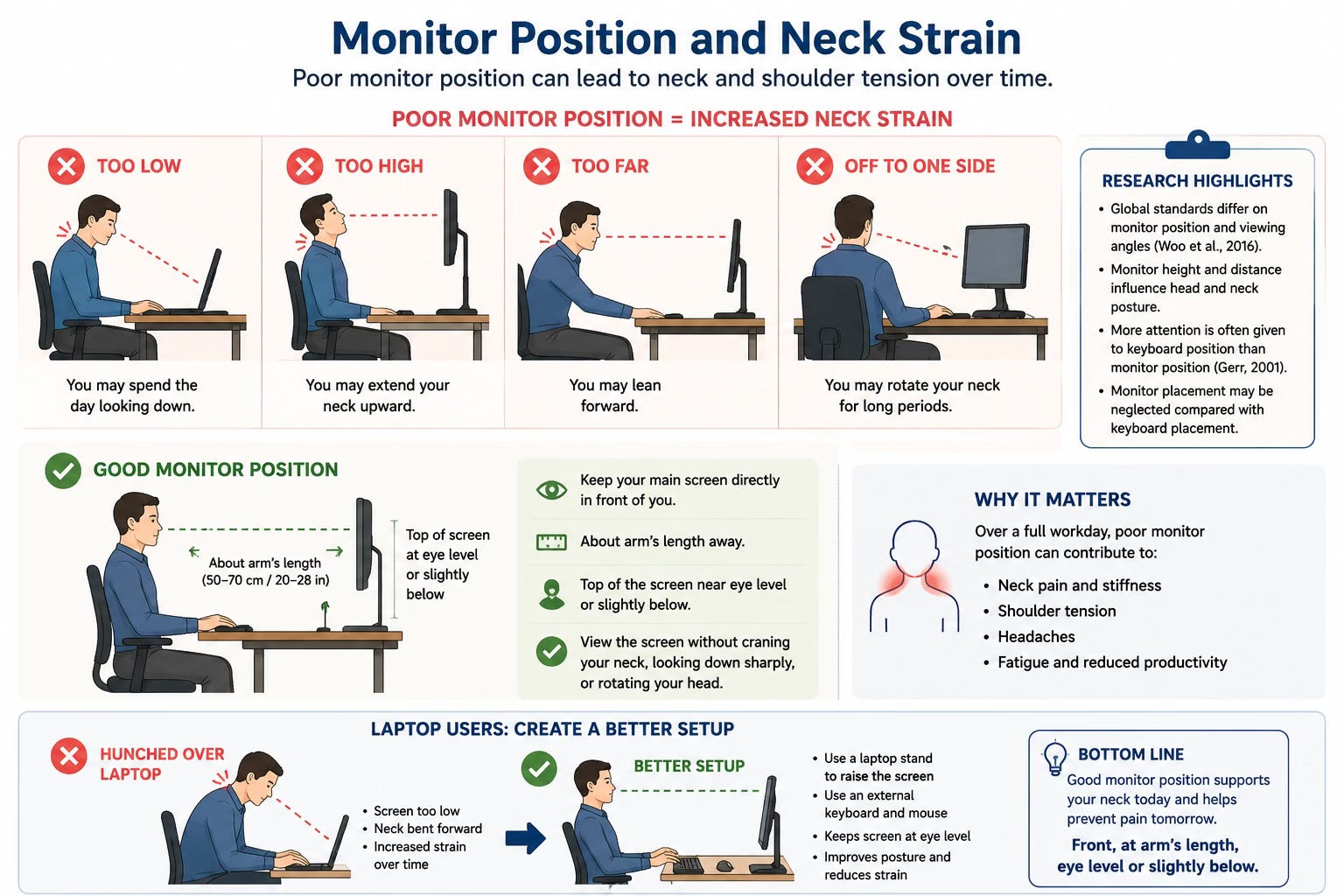
Monitor position is one of the most important parts of an ergonomic setup. If the screen is too low, you may spend the day looking down. If it is too high, you may extend your neck upward. If it is too far away, you may lean forward. If it is off to one side, you may rotate your neck for long periods.
The Woo et al. review found that global ergonomics standards differ in their workstation recommendations, including monitor position and viewing angles (Woo et al., 2016). This inconsistency matters because monitor height and distance can influence head and neck posture.
The NIOSH report also found that workstation design and adjustment practices appeared to give more attention to keyboard position than monitor position. The researchers found a stronger relationship between elbow height and keyboard height than between eye height and monitor height, suggesting that monitor placement may be neglected compared with keyboard placement (Gerr, 2001).
Clinically, this makes sense. Many people adjust their chair and keyboard so they can type comfortably, but they leave the monitor too low, too high, or too far away. Over a full workday, this can contribute to neck and shoulder tension.
A practical rule is to keep your main screen directly in front of you, roughly at arm’s length, with the top of the screen near eye level or slightly below. You should be able to view the screen without craning your neck forward, looking sharply downward, or rotating your head for long periods.
For laptop users, this is especially important. Laptops are convenient, but they create an ergonomic compromise because the screen and keyboard are attached. For longer work sessions, using a laptop stand with an external keyboard and mouse is usually much better than working hunched over the laptop.
Keyboard Height and Elbow Position
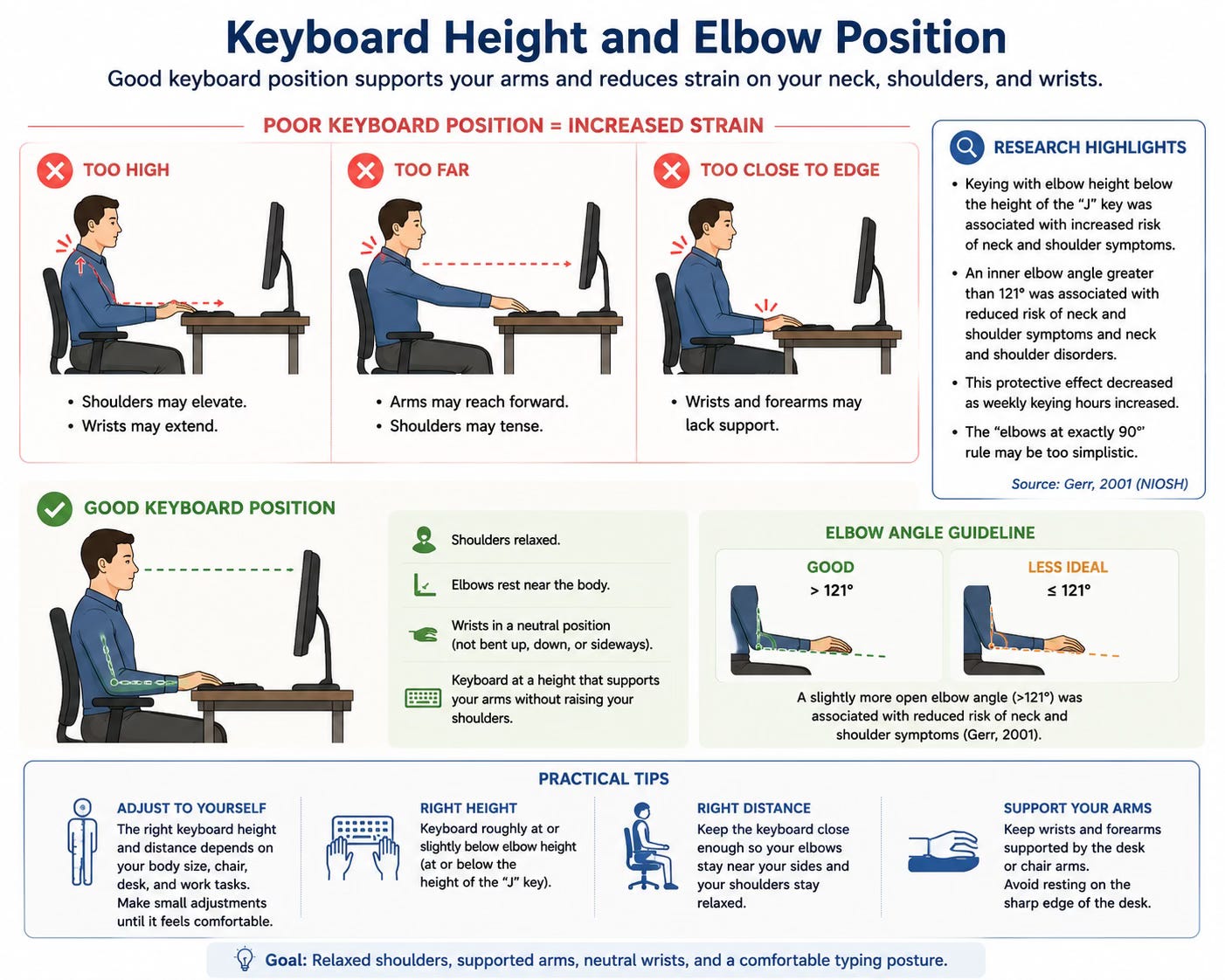
Keyboard position matters because it affects the shoulders, elbows, forearms, wrists, and hands. If the keyboard is too high, the shoulders may elevate and the wrists may extend. If it is too far away, the arms may reach forward and the shoulders may tense. If it is too close to the desk edge, the wrists and forearms may lack support.
In the NIOSH report, keying with elbow height below the height of the “J” key was associated with increased risk of neck and shoulder symptoms. The same report found that an inner elbow angle greater than 121 degrees was associated with reduced risk of both neck and shoulder symptoms and neck and shoulder disorders, although this protective effect decreased as weekly keying hours increased (Gerr, 2001).
This is a useful reminder that the common “elbows at exactly 90 degrees” rule may be too simplistic. For some people, a slightly more open elbow angle and a keyboard position that does not force the shoulders to elevate or the wrists to strain may be more comfortable.
The keyboard should generally be positioned so the shoulders feel relaxed, the elbows can rest near the body, and the wrists do not have to bend sharply upward or sideways. The exact position may vary depending on your body size, chair, desk, and work tasks.
Mouse Position: A Common Source of Shoulder and Wrist Strain
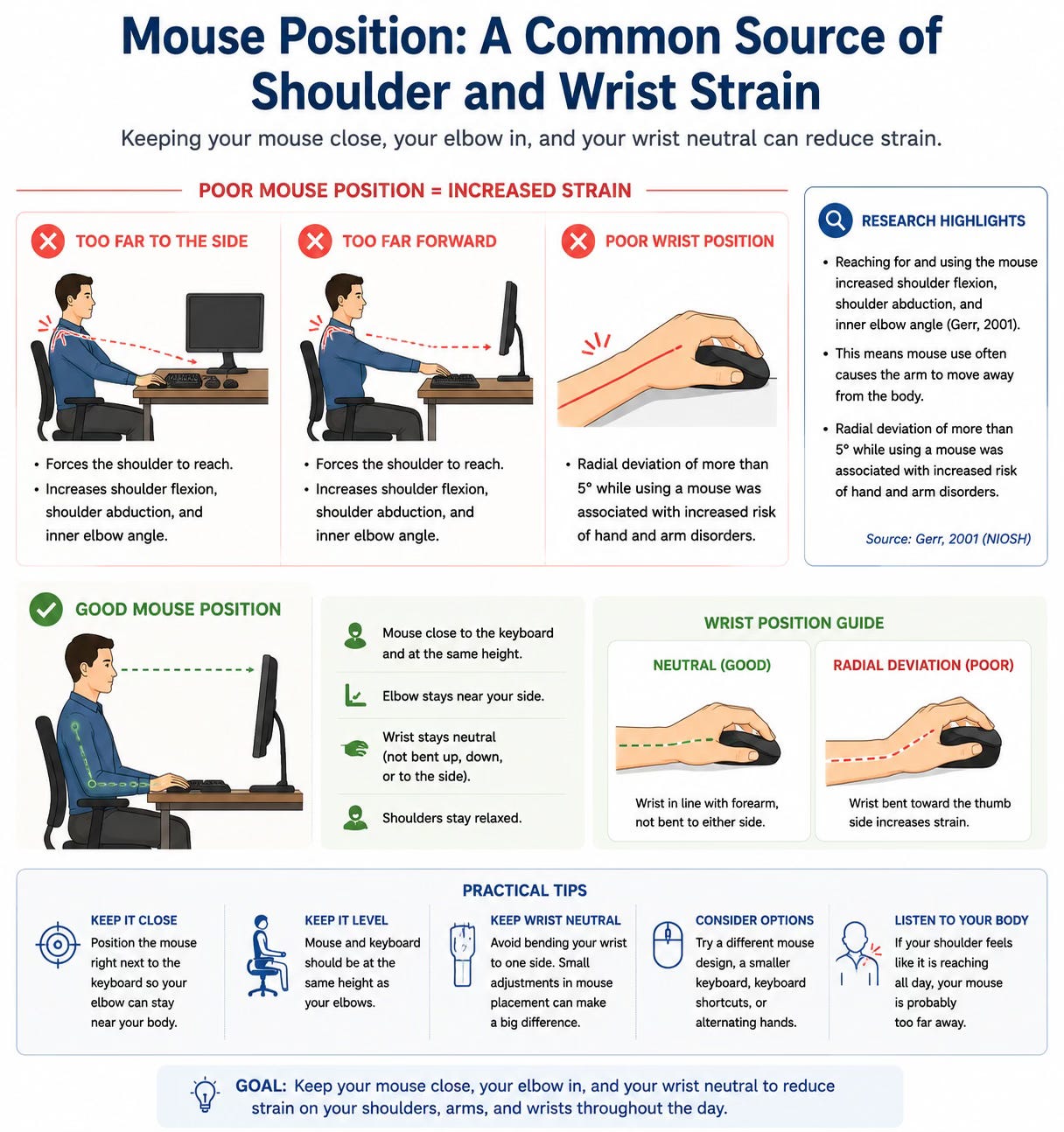
Mouse use is one of the most overlooked ergonomic issues. Many people keep the mouse too far to the side or too far forward. This forces the shoulder to reach repeatedly throughout the day.
The NIOSH report found that reaching for and using the mouse increased shoulder flexion, shoulder abduction, and inner elbow angle (Gerr, 2001). In plain language, using the mouse often made people reach their arm away from the body. Over time, repeated reaching can contribute to shoulder, neck, forearm, or wrist discomfort.
The report also found that radial deviation of more than 5 degrees while using a mouse was associated with increased risk of hand and arm disorders (Gerr, 2001). Radial deviation refers to the wrist bending toward the thumb side. This kind of repeated or sustained wrist position may increase strain in the wrist and forearm.
A practical solution is to keep the mouse close to the keyboard, at the same height, and within easy reach. Your elbow should stay near your side. Your wrist should remain relatively neutral, not bent sharply to one side. If your shoulder feels like it is reaching all day, your mouse is probably too far away.
Some people may benefit from a different mouse design, a smaller keyboard, keyboard shortcuts, or alternating mouse hands, depending on the situation.
Arm Supports and Alternative Mouse Designs
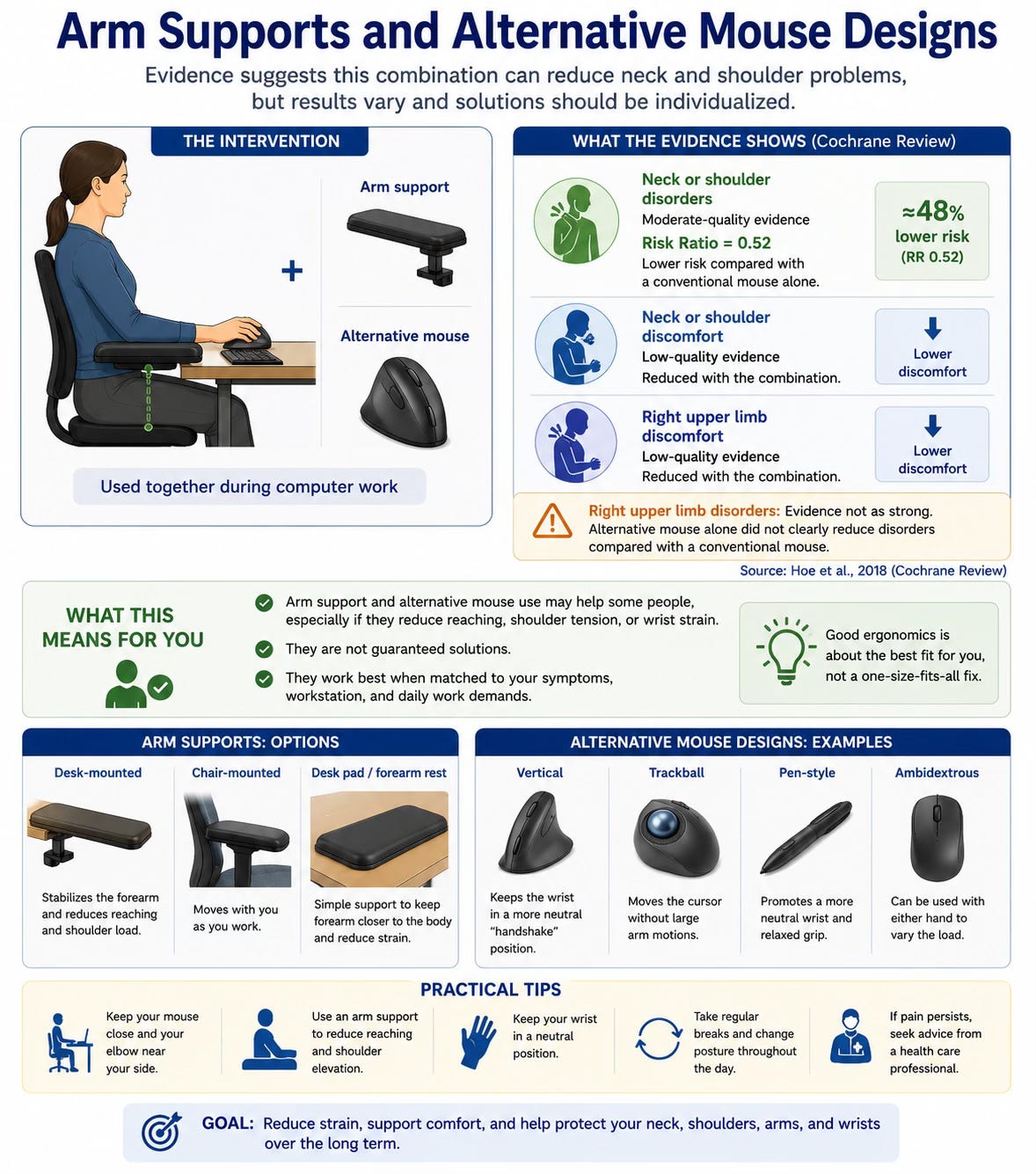
The Cochrane review found moderate-quality evidence that using an arm support together with an alternative computer mouse reduced the incidence of neck or shoulder disorders compared with a conventional mouse alone. The reported risk ratio was 0.52, meaning the intervention group had a lower risk of neck or shoulder disorders in the included studies (Hoe et al., 2018).
The same review found low-quality evidence that this combination reduced neck or shoulder discomfort and right upper limb discomfort. However, the evidence was not as strong for reducing right upper limb disorders, and alternative mouse use alone did not clearly reduce disorders compared with a conventional mouse (Hoe et al., 2018).
For patients, this means that arm support and mouse changes may help some people, especially if they reduce reaching, shoulder tension, or wrist strain. But they should not be seen as guaranteed solutions. They work best when matched to the person’s symptoms, workstation, and daily work demands.
Wrist Rests: Helpful or Harmful?
Wrist rests are commonly recommended, but they are not always used properly. A wrist rest should not be used as a place to press the wrist heavily while typing. It is better used lightly during pauses, not as a constant pressure point.
The NIOSH report found that use of a wrist rest was associated with decreased wrist flexion in posture measurements, but in some analyses, the presence of a keyboard wrist rest was associated with increased risk of hand and arm symptoms and disorders (Gerr, 2001). The authors interpreted this carefully and did not conclude that all wrist rests are harmful. The relationship appeared to depend on how the wrist rest and keyboard were positioned.
The practical message is that wrist rests are not automatically good or bad. They must be used correctly. Avoid planting the wrist heavily on a hard surface while typing. Keep the wrists neutral, float the hands lightly when typing, and use support during pauses if helpful.
If a wrist rest increases pressure, numbness, tingling, or discomfort, it may need to be removed or repositioned.
Sit-Stand Desks: Useful, But Not Magic
Sit-stand desks have become popular, especially for people who sit for long periods. They can be helpful because they allow position changes throughout the day. However, standing all day is not automatically better than sitting all day.
The Cochrane review found very low-quality evidence from one study that sit-stand workstations did not clearly reduce neck and shoulder discomfort or pain compared with usual working conditions (Hoe et al., 2018). This does not mean sit-stand desks have no value. It means that simply replacing a sitting desk with a sit-stand desk may not be enough to prevent pain.
The key is how the desk is used. Alternating between sitting and standing, taking walking breaks, adjusting monitor height, keeping the keyboard and mouse at comfortable levels, and avoiding prolonged static standing are all important.
A sit-stand desk should be used to create movement variety, not to replace one fixed posture with another fixed posture.
Breaks Are Part of Ergonomics
Breaks are not separate from ergonomics. They are one of the most important parts of it.
The Cochrane review found very low-quality evidence that supplementary breaks may reduce discomfort in the neck, right shoulder or upper arm, and right forearm, wrist, or hand among data entry workers (Hoe et al., 2018). Although the quality of evidence was low, the finding makes practical sense. Muscles and joints often tolerate work better when sustained loading is interrupted.
Even a well-designed workstation cannot remove all strain if someone sits and types for hours without interruption. The body needs changes in position. Muscles need recovery. Joints need movement. Eyes need breaks from the screen.
A useful strategy is to take short movement breaks throughout the day. This does not need to be complicated. Stand up, walk briefly, roll the shoulders, gently move the neck, open the chest, stretch the hips, or take a few slow breaths away from the screen.
Microbreaks are especially helpful because they interrupt the buildup of strain before it becomes noticeable. A one- or two-minute break every 20 to 30 minutes can sometimes be more useful than one long break after several hours of discomfort.
Ergonomic Training Alone May Not Be Enough
Many workplaces offer ergonomic training, but education alone does not always change outcomes. The Cochrane review found low- to very low-quality evidence that ergonomic training may or may not prevent work-related musculoskeletal disorders of the upper limb or neck among office workers (Hoe et al., 2018).
This is important because people often know what they “should” do but still struggle to apply it. They may know their screen should be higher, but they do not have a monitor stand. They may know they should take breaks, but their workload does not allow it. They may know they should avoid reaching for the mouse, but their keyboard is too wide. They may know they should exercise, but pain makes them hesitant.
Training is most useful when it is practical, individualized, and paired with real changes to the workstation and work routine.
The Problem With Repetition
Ergonomics is not only about posture. It is also about repetition and workload.
The NIOSH report found that hours of keying per week were associated with both hand and arm symptoms and hand and arm disorders (Gerr, 2001). This means that the amount of typing matters. Even with a good setup, long periods of repeated keying can still increase strain.
This is important for people who type, code, document, chart, schedule patients, write reports, process claims, or answer emails for many hours per day. The more repetitive the task, the more important breaks, variation, and recovery become.
Reducing unnecessary repetition can help. This may include using keyboard shortcuts, speech-to-text tools, templates, alternating tasks, taking microbreaks, and avoiding long uninterrupted blocks of typing when possible.
Your Chair Matters, But It Is Not the Whole Solution
A good chair can help support the spine, hips, and pelvis. Adjustable seat height, lumbar support, a stable base, and comfortable seat depth can make sitting easier.
However, the NIOSH report found that simply having an easily adjustable chair was not necessarily associated with better measured postures among computer users (Gerr, 2001). This does not mean adjustable chairs are useless. It means that providing equipment alone is not enough if people do not know how to use it, do not adjust it, or continue working in the same habits.
This is a common real-world issue. Many people have expensive office chairs but never change the settings. Others sit at a desk that is too high, so even a good chair cannot fully solve the problem. Some people have a chair that fits well but still sit for hours without moving.
A chair is a tool. It helps, but it does not replace movement, breaks, and a properly arranged workstation.
Documents, Phones, and Small Habits That Matter
People often focus on the chair and monitor but ignore documents, phones, notebooks, and secondary screens. These smaller details can matter.
The NIOSH report found that participants using a document holder had different head and gaze positions than those who did not use one. A document holder can reduce repeated looking down or rotating the neck when copying from papers (Gerr, 2001).
The report also found that using a telephone shoulder rest was associated with increased risk of neck and shoulder symptoms and disorders (Gerr, 2001). This makes sense because holding a phone between the ear and shoulder can place the neck in a side-bent, compressed position. For anyone who spends significant time on the phone, a headset or speaker option is usually better.
These details may seem small, but ergonomics is often about small repeated exposures. A few minutes of awkward neck position may not matter. Doing it repeatedly every day can become a problem.
Ergonomics for Working From Home
Working from home has made ergonomics even more important. Many people work at kitchen tables, couches, beds, or small temporary desks. These setups may be fine for occasional use, but they are usually not ideal for full workdays.
The biggest work-from-home problem is laptop posture. When a laptop sits flat on a table, the screen is usually too low. This encourages forward head posture, rounded shoulders, and upper back strain. If the laptop is raised to eye level, the keyboard becomes too high. This is why an external keyboard and mouse are so helpful.
A simple home setup can include a laptop stand, separate keyboard, separate mouse, supportive chair, and screen positioned directly in front of you. You do not need a perfect office to make meaningful improvements. Even small changes can reduce daily strain.
Ergonomics Is About Reducing Load, Not Blaming Posture
It is important not to turn ergonomics into fear. People should not feel that every posture is dangerous or that their spine is fragile. The body is strong and adaptable. Pain is usually influenced by many factors, including sleep, stress, workload, strength, activity, recovery, and overall health.
Ergonomics is not about blaming people for how they sit. It is about making the environment easier on the body.
A better setup reduces unnecessary load. Better habits reduce repetition. Movement breaks reduce static strain. Exercise builds capacity. Together, these changes can help people feel and function better.
How Chiropractic Care May Help
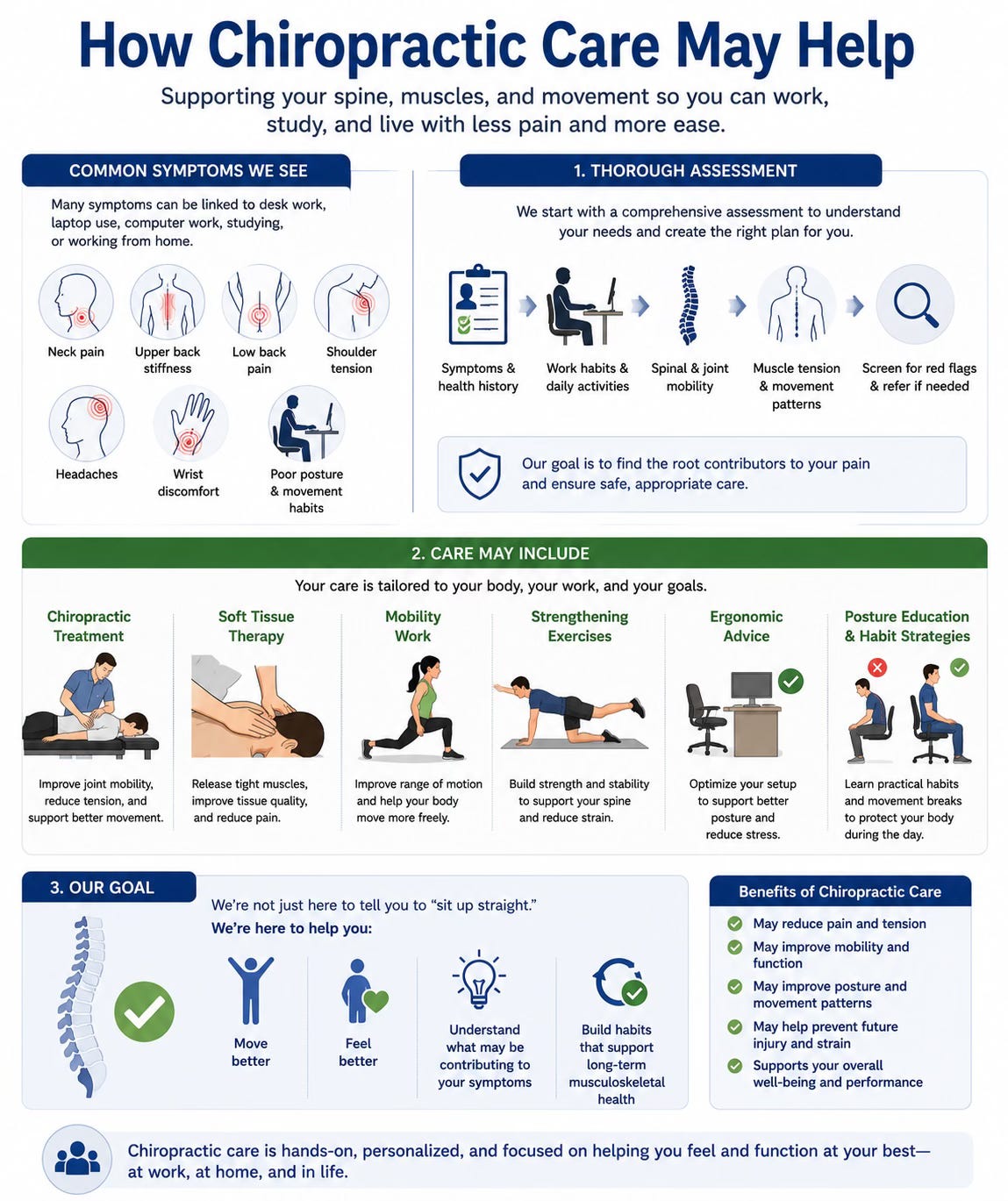
At The Muscle and Joint Clinic, we often see patients with neck pain, upper back stiffness, low back pain, shoulder tension, headaches, wrist discomfort, and posture-related symptoms that may be connected to desk work, laptop use, computer work, studying, or working from home.
Chiropractic care begins with a proper assessment. We look at the patient’s symptoms, work habits, posture, spinal and joint mobility, muscle tension, movement patterns, and any signs that may require referral or further investigation.
For many patients, discomfort is related to mechanical factors such as joint restriction, muscle tension, reduced mobility, prolonged sitting, repetitive strain, weakness, or poor movement habits. Care may include chiropractic treatment, soft tissue therapy, mobility work, strengthening exercises, ergonomic advice, posture education, and strategies to reduce strain during work.
The goal is not simply to tell people to “sit up straight.” The goal is to help patients move better, feel better, understand what may be contributing to their symptoms, and build habits that support long-term musculoskeletal health.
Practical Ergonomic Tips
Start with your screen. Place your main monitor directly in front of you and close to eye level. Avoid looking down at a laptop for long periods.
Keep your keyboard and mouse close. Your elbows should stay near your body and your shoulders should feel relaxed.
Avoid reaching for the mouse. If your mouse is far away, bring it closer. If your keyboard is very wide, consider whether it is forcing the mouse too far to the side.
Support your lower back. Sit back into the chair and use lumbar support if helpful.
Keep your feet supported. If your feet do not comfortably reach the floor, use a footrest.
Avoid holding the phone between your ear and shoulder. Use a headset, earbuds, or speaker option when possible.
Take regular breaks. Stand, walk, stretch, and change position often.
Use a laptop stand for longer sessions. Pair it with an external keyboard and mouse.
Do not chase perfect posture. Focus on comfort, support, and movement variety.
The Bottom Line
Ergonomics matters because many people spend hours each day at computers, laptops, and phones. Small workstation problems repeated over time can contribute to neck pain, shoulder tension, back pain, wrist discomfort, and fatigue.
The evidence shows that computer workstation design is complex, and guidelines are not always consistent (Woo et al., 2016). Research on computer users also shows that many people work in non-neutral postures, and that factors such as keyboard position, mouse use, telephone habits, and hours of keying can influence musculoskeletal symptoms and disorders (Gerr, 2001).
At the same time, high-quality evidence for many ergonomic interventions remains limited or mixed. A Cochrane review found that some interventions, such as arm supports combined with alternative mouse designs and supplementary breaks, may help in certain situations, but many interventions do not have strong evidence as standalone solutions (Hoe et al., 2018).
The solution is not one perfect posture, one perfect chair, or one perfect desk. The solution is a better setup, less unnecessary strain, regular movement, appropriate breaks, and enough strength and mobility to tolerate the demands of the workday.
Your workstation should fit your body and your work. Your body should not have to constantly adapt to a poorly designed workstation.
Disclaimer
This article is for general educational and informational purposes only and is not intended to replace individualized medical advice, diagnosis, or treatment. Ergonomic recommendations should be adapted to the individual, the work environment, and any existing health concerns.
If you have severe, worsening, persistent, recurrent, or unusual pain, numbness, weakness, radiating symptoms, or symptoms affecting your ability to work or function, please seek assessment from a qualified health professional.
References
Gerr, F. (2001). Musculoskeletal disorders among VDT operators: Final report (NIOSH R01-OH03160). Rollins School of Public Health, Department of Environmental and Occupational Health, Emory University.
Hoe, V. C. W., Urquhart, D. M., Kelsall, H. L., Zamri, E. N., & Sim, M. R. (2018). Ergonomic interventions for preventing work-related musculoskeletal disorders of the upper limb and neck among office workers. Cochrane Database of Systematic Reviews, 2018(10), CD008570. https://doi.org/10.1002/14651858.CD008570.pub3
Woo, E. H. C., White, P., & Lai, C. W. K. (2016). Ergonomics standards and guidelines for computer workstation design and the impact on users’ health: A review. Ergonomics, 59(3), 464–475. https://doi.org/10.1080/00140139.2015.1076528